
Introduction
This article explains the counting method in more detail.
By understanding the features of the counting method, you can use location information to refer to operation information and loading/unloading records.
Count: Automatic AUTO
How it works
- The stop threshold is disabled in pass mode automatic count.
- Time is calculated from the moment the machine enters the geofence until it exits.
- The count is recorded when the dump leaves the area.
- Loading time continues accumulating until the machine exits the area.
|
|
Step-by-step flow
Step 1 Before entering Machine is outside the geofence area. | Step 2 Machine enters → Count starts Count begins automatically on entry. Pass mode is ON — stop threshold (4 km/h) is invalid. | Step 3 Machine exits → Count recorded Count is finalized and recorded as the machine leaves the loading area. |
Count: Manual
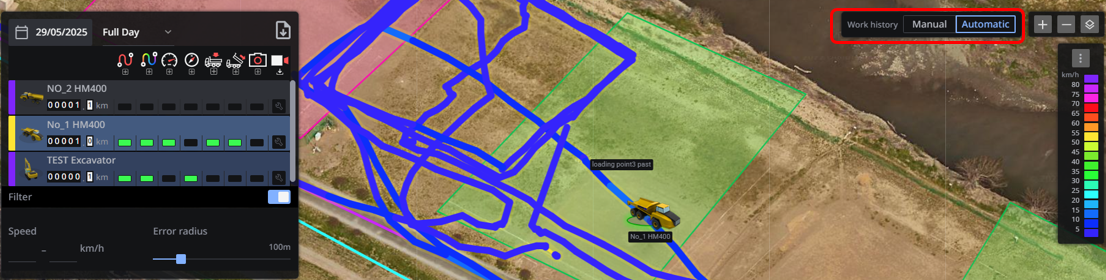 How it works
- After entering the area, the count starts when the push button is pressed.
- The stop threshold (4 km/h) is active — speeds below 4 km/h are judged as stopped.
- If the dump's speed is above the threshold, that time is not counted as unloading.
- No count is recorded unless the button is pressed after entering the area.
Stop threshold 4 km/h (disabled in Auto mode) | Count as passing Valid |
Step-by-step flow
Step 1 Before entering Stop threshold (4 km/h) is active. Unloading time requires entry + button press. | Step 2 Enter area + press button Count begins only after the machine enters and the operator presses the push button. | Step 3 Speed check applies If speed is above 4 km/h after entry, that period is not included in unloading time. |
Automatic vs Manual — Quick Comparison | ||
| Item | Automatic | Manual |
| Count start trigger | Entering the geofence (automatic) | Entering the area + pressing the button |
| Stop threshold (4 km/h) | ✕ Disabled (Pass mode ON) | ✔ Active — below 4 km/h = stopped |
| Count confirmed | On exit from the geofence area | While below threshold after button press |
| Button operation | Not required | Required — no button = no count |
| Best suited for | Pass-through scenarios; minimal operator input | Precise timing control; operator-confirmed events |
Important: Multiple Count Warning
When a geofence is set on a machine, the count may be recorded multiple times if a dump truck first passes through the area geofence and then also passes through the geofence set on the machine itself. Be mindful of geofence placement and the order in which zones are traversed.
Comments
0 comments
Article is closed for comments.